Showing posts with label HP. Show all posts

March 21, 2014

HP Slatebook 10 X2

Most of the laptop-tablet hybrids we’ve seen – which try to combine two devices in one – run Windows 8. Although the HP Slatebook 10 X2 looks like a smaller version of the Windows 8-equipped HP Split X2 (see our review, Issue 413), it couldn’t be more different as it runs Android instead.

Tablet
The Slatebook weighs 610g which is relatively light for a 10in tablet, although other similarly sized tablets – such as the iPad Air and the Amazon Kindle Fire HDX 8.9 (see our reviews, Issues 411 and 414 respectively) – are much lighter. One feature the Slatebook does have – that those tablets don’t – is a microSD card slot for adding more storage in addition to the 64GB already built-in. 64GB is a generous amount of storage for a tablet at this price. Although the grey, plastic build is a bit creaky in places, overall it’s reasonably sturdy.

The Slatebook’s 10in screen has a resolution of 1920x1080 pixels so text looks sharp. Colour accuracy and brightness were a little off though, especially when compared to other 10in tablet screens, but it’s good enough.
Although the Slatebook has one of Nvidia’s latest tablet processors – performance wasn’t flawless. It didn’t have any trouble handling detailed 3D graphics, but there was a small but noticeable amount of lag when scrolling through complex webpages and running multiple apps simultaneously.

Battery life was far below average for a 10in tablet. When playing videos continuously, the Slatebook lasted just over seven hours - rival 10in tablets can last twice as long in the same test. The keyboard dock does have a second battery which adds another five hours of battery life. Although a welcome boost, it’s a shame the Slatebook isn’t capable of long battery life without it.

Laptop
When plugged into the keyboard dock, the Slatebook’s weight increases to 1.3kg, which is light for a laptop. The docking joint forms part of the hinge; it feels pretty sturdy and doesn’t wobble too much. The dock adds a USB2 port, a full-size SD card reader and an HDMI connector which are useful, but there’s no USB3 or Ethernet port. When docked, the display tilted back reasonably far so we could get a comfortable viewing angle.
Plus, unlike the Split X2, the thick hinge didn’t dig into our legs when used on our lap. Of course, the most important thing about the keyboard dock is how comfortable it is to type on and here the Slatebook falls short. It’s not disastrous - the keys have enough travel, but they’re small and feel both a little cramped and too spongy. We did get used to them eventually and managed to type quickly without too many errors, but it’s no match for a quality keyboard on a traditional laptop.

The Slatebook’s suitability as a laptop substitute depends just as much on software as it does on hardware. HP hasn’t meddled with the Android 4.3 Jelly Bean operating system – which is a stance we usually prefer – but here it would’ve benefited from some modifications to make it work more smoothly with the keyboard and touchpad.

For example, parts of the Android interface which you usually swipe downwards with your finger – such as the Notifications drawer and the Settings drawer – require a click, hold and drag which is fiddly to accomplish on the small touchpad. If you’re a frequent user of keyboard shortcuts on Windows or Mac, then the relative lack of them on Android will be frustrating. You could, of course, alternate between the touchscreen and keyboard, but this quickly results in arm ache.

Unlike Windows 8, you can’t have two apps on screen at the same time in Android. Although this can help you concentrate on a particular task without being distracted, it also makes multitasking more difficult. Samsung has
modified Android on its tablets so that some apps can run onscreen side by side. Although not perfect, a similar feature would’ve been welcome here.

Another potential problem is the continuing lack of Android apps designed to work with high-resolution tablet screens. HP has included a couple of apps to get your started. There’s a basic file manager, but the unlabelled and crypticlooking icons make it fiddly to use. More useful is Kingsoft Office, an app for editing Word, PowerPoint and Excel files. It has trouble displaying especially complex files correctly – such as spreadsheets with lots of complex formulae and charts – but it’s more than good enough for working on simpler files.

However, Kingsoft Office isn’t exclusive to the Slatebook – it fact it’s free for both the iPad and other Android tablets. It’s not all bad. Android 4.3 has builtin support for multiple-user accounts. Each member of your household can have their own separate sets of apps and data, so there’s little danger of your kids accidentally messing with your important files.

Conclusion
As a tablet, the Slatebook isn’t bad, but it’s hardly exemplary due to its relatively short battery life and average screen. Its keyboard isn’t bad either, but it won’t suit everyone and is let down by incomplete software support. The Slatebook is best used for occasional or simple writing projects rather than as a full-time replacement for a laptop. In short, the Slatebook is a jack of all trades, but a master of none.

Read More ..

March 19, 2014

HP SPECTRE 13

HP’S SPECTRE 13 runs Windows 8, but it doesn’t contort, flip, swivel, or do any other impractical tricks of so many hybrid notebook-tablet hybrids. It’s just a regular old Ultrabook—but a very good one.

If what you really want is a thin-and-light notebook with a great keyboard, a high-resolution display, and the power to tackle nearly any workload, the Spectre 13 comes pretty darn close to delivering that ideal design. It also leverages one of Windows 8’s touch capabilities to deliver a great innovation in usability: an almost comically wide touchpad dubbed the Control Zone; more about that shortly. The Spectre 13 looks a lot like Apple’s MacBook Air.

The Spectre 13’s aluminum unibody chassis feels sturdy without being especially heavy (it weighs in at 3.3 pounds). The shiny purplish lid is distinctive but not ostentatious.

Under the hood, you’ll find a fourth-generation Intel Core i5-4200U CPU paired with 4GB of DDR3/1600 memory. The 128GB solid-state drive feels a bit cramped, but you can double the storage for an additional $150. The PC packs Intel’s integrated graphics, so you won’t get much in the way of gaming performance, though dialing down the settings will do in a pinch. Those components are good enough to earn a respectable WorldBench 8.1 score of 270.

One shortcoming you won’t be able to fix is the Spectre 13’s cooling fan. It kicks in when the processor starts doing any heavy lifting, and the noise can be annoying. HP claims a battery life of 9 hours, but it delivered 7.5
hours in our batteryrundown test. That’s an hour-plus more than what Sony’s VAIO Pro 13 delivered, and nearly 2 hours more than Lenovo’s ThinkPad Yoga.

The 13.3-inch, 1920-by-1080-pixel display is nice and bright, with excellent viewing angles. Photos and videos look great, but if you’d like higher resolution, you can upgrade to a 2560-by-1440-pixel display for another $70. The Beats Audio speakers are very good, pumping out rich, well-rounded audio with a bit of bass.

The keyboard’s wide, spacious backlit keys are easy to reach, though the arrow keys are a bit cramped. The primary role for the row of function keys up top is media player control. If you want to use them as traditional function keys, hold down the Fn key. And then there’s the aforementioned Control Zone trackpad, which is designed to ease your transition to Windows 8 by translating its touch gestures into actions you can perform by
swiping on a touchpad—a method users are already familiar with— instead of by jabbing at a touchscreen. This helps make the Windows 8 experience feel more natural.

HP’s Spectre 13 won’t convert those wary of Windows 8, but it solidly delivers the basics.

Read More ..

January 07, 2009

HP COLOR LASERJET CM232ONF MFP


AIO with Almost Everything

In most ways, this HP printer is one of the best color laser all-in-ones ( AIOs) yet for the price. It offers good speed and high output quality as well as almost any AIO function you can think of. Unfortunately, it stubs its toe by leaving out one fundamental feature: duplexing, the ability to print on both sides of the page. What you're left with is an AIO that's well worth considering but that's one duplexer short of a slam-dunk winner.

Clearly targeted for a small office or workgroup, the LaserJet prints, scans, and faxes over a network and can act as a standalone fax machine and color copier. In addition, it can send e-mail or scan to a PC
on your network, automatically opening a new message with the PCs e-mail program and attaching the scanned document to the message.

Despite the lack of a duplexer, the paper handling should be adequate for most offices. with a standard capacity of 300 sheets. The flatbed scanner is limited to a maximum of letter size, but the automatic document feeder (ADF) can handle legal-size paper.


Text quality is a bit below par for a laser but definitely good enough for most business needs. Graphics output is superb. with no major flaws. Photo quality, similarly. is in the top tier for a color laser AIO. One annoyance we noted on our test was that all the paper came out with a slight curl But overall, this printer is an attractive choice.—M. David Stone

PC Magazine January 2009

Read More ..

January 02, 2009

HP HDX16T


HP's Gorgeous Media Center

The HP HDXI6t rides the line between a thin-and-light and a desktop-replacement laptop. Whichever category it falls into. you're bound to do a double take when you see it. The sleek 16-inch widescreen represents the dawn of laptops doubling as high-def home theaters. It is designed to fit into a living room or home office, and the fast Intel Centrino 2 components will keep it from becoming a relic overnight.

The HDX16t looks and feels modern. The inmold decorated design on the cover consists of squiggly lines varying in length, curvature,and color. The palm rests and touchpad receive the same artistic treat meat. Also, the HDX16t fits in a compressed numeric keypad without sacrificing the comfort of a full-size keyboard. The widescreen display has a 16:9 aspect ratio, giving a sensational movie experience. This system also has plenty of USB ports (four) in addition to the combo port and memory card reader. A 250GB hard drive comes standard, but you can upgrade to a 320GB drive for $25.

While this system's 2.8-GHz Intel Core 2 Duo T9600 processor is blazingly powerful—especially when coupled with 3GB of Memory—you'd be better off with the 2.4-GHz P8600 processor option, because it's less expensive and more energy efficient. But the 2.8-GHz processor does dominate in benchmark tests. Its SYSmark 2007 Preview Overall score bested the Sony comparison system by 3 percent and the Acer system by 48 percent. It finished the video encoding tests in under a minute, something that its competitors couldn't accomplish And the HDX16t's graphics chipset excelled on 3DMark 06. Crysis, and World in Conflict tests.


In everything but battery life. the HP HDX16t's performance scores and feature set trump those of its competition. This system is sure to liven up your living room or home office and is a worthy recipient of our Editors' Choice.—Cisco Cheng


Specs: 2.8-GHz Intel Core 2 Duo T9600; 3GB DDR2 SDRAIvI; 250GB, 5,400-rpm hard drive: 512MB nVidia Gelorce 9600M GT graphics; 16-inch, 1,980-by-1,080 display; Intel WiFi Link 5100 802.11n; 6.8 pounds (7.9 pounds travel); four USB ports, one FireWire port; 56-Wh, 52-Alt, lithium ion battery; Windows Vista Home Premium.

PC Magazine January 2009

Read More ..

December 07, 2008

HP TouchSmart IQ816


Touch PC is finally ready for HD

WHEN WE REVIEWED HP's original TouchSmart IQ506, we were very impressed by everything the touch-oriented all-in-one offered to those looking for a catch-all home media and computing solution. About all we thought was missing was satisfactory HD support pretty much precluded by the presence of a 22-inch monitor and the absence of a Blu-ray drive. HP has now released the newer, larger TouchSmart IQ816, available for $2,099, to address this concern. It offers a BD-ROMDVD±RW optical drive and a 25.5-inch integrated display. But while were glad to see that the line is taking some important steps toward addressing newer technologies, we're not completely satisfied with the results.

Specifically, the IQ816's Blu-ray playback struck us as only fair. Watching X-Men: The Last Stand, the colors were grainy and the video was fat less sharp than we'd hope for with an HD system. (The overall quality wasn't appreciably better than what we saw with ow standard-definition DVD of The Matrix.) Using our FED HQV Benchmark tool, we detected plenty of jagged edges on what should have been smooth lines. as well as more of the "noisy" video that prevents an absolutely clear viewing experience.

We were also a bit annoyed at the overinflated dimensions of the TouchSmart I0816's display, which made it somewhat more difficult to deal with than its predecessor. Whereas the IQ506 was viewable right to the edges of its display's bezel, the IQ816 is not: It has 1-inch black bands on the left and tight sides of the screen and quarter-inch bands on the top and bottom, all of which add more bulk to an already fairly large machine. Because of this, we had more difficulty moving and setting up the IQ816 than we anticipated ideally, it's a two-person job.

That said, we still found quite a bit to like in this newest TouchSmart, beginning with improved performance. The 2.1GHz Core 2 Duo T8100 processor and Nvidia GeForce 9600M GS graphics represent considerable jumps font the IQ506's components. Although the IQ816's scores aren't spectacular, they are noticeable improvements: 699 in Cinebench 9.5, 4,633 in Cinebench 10 (both using the tests' 64-bit versions), 7 minutes and 55 seconds for Windows Media Encoder, and 4 minutes and 31 seconds for Mines. (As with the 10506, none of our full-system tests—FutureMark's PCMark05, PCMark Vantage, or SYSMark 2007—would run; neithet would run 3D tests, 3DMark06 or 3DMark Vantage.) The biggest change was in gaming:The IQ816's average frame rates of 40 frames per second (fps) in Company of Heroes in DirectX 9 (DX9) and 32.8fps in DX10 are solidly playable in a way the IQ506's were not (that system scored 9.3fps in the DX9 Company of Heroes test).

A bigger hard drive (750GB, versus 500GB) and a generous 4GB of RAM round out the package and keep the TouchSmart IQ816 a good choice for watching and recording television shows using the integrated TV tuner and the 64-bit Windows Vista Home Premium operating system.There are lots of other connectivity options as well, from a multi format card reader to five USB 2.0 ports. S/PDIF and S-Video jacks, audio-in and out jacks, a port for an IR blaster, and a Webcam in the top of the bezel. Other nice touches are the volume controls on the right side of the display, which let you raise or lower the volume without having to disrupt your movie watching and the light beneath the display that can illuminate your desk or keyboard (the IQ816 comes with a wireless one, as well as a wireless mouse), as you see fit.

We also remain fans of the TouchSmart software, which eases navigation through the often labyrinthine menus in which Windows often hides its programs. Anyone who wants to be able to access frequently used apps and browse photos or music with the flick of a finger can use the software without any lessons; for anything more complicated, the Windows desktop is just a click away.


No, the software isn't for advanced users, but it was never supposed to be—it's for people who want to keep their computing simple. So we can't quibble with the TouchSmart's overall design philosophy. We just wish that the IQ816 were more HD-and back-friendly (it's heavy and very wide) so it could realize even more of its promise as the ultimate media-management PC for your home.

—Matthew Murray
www.hp.com

Computer Shopper January 2009

Read More ..

HP Mini 1000


Netbook has a killer keyboard, so-so speed

HP'S MINI-NOTE 2133 STOOD OUT with its high-res screen, Windows Vista OS—and high price.The new, low-priced Mini 1000 doesn't seem as distinctive, however, since its specs ate almost identical to those of its competitors.

The Mini 1000 is impressive, with solid construction, a stylish and svelte case, a superb keyboard, and a super-blight screen. The glossy black lid now sports a subtle Swirl pattern. The keys are no longer slick and shiny but subtly textured, and the screen has grown from 8.9 to 10.2 inches. Despite the larger display, the Mini 1000 has slimmed down to lx10.3x6.6 inches (HWD) and 2.5 pounds, making it the smallest, thinnest netbook yet with a full 10-inch-wide keyboard.

The standout feature of the Mini 1000 is its 92 percent keyboard.The keys feel solid, without the usual tapered edges, civing them flat tops with a slightly larger surface to hit.The layout is excellent, with none of keys found on other net books.The wide touch pad is very responsive; its buttons are easy to press, although we wish they were below the pad instead of off to the side.

The 1,024x600-pixel display is so bright that blacks looked gray at full brightness. Turning down the brightness solves this issue. The display is sharp and has a very wide viewing angle, but its glossy finish is sometimes annoying. Though I-W plans to offer an 8.9-inch screen as an option, the high-res 1,280x768 screen from the Mini-Note 2133 will not be available.

The 2133's anemic VIA processor has been replaced by the netbook-standard 1.6GHz Intel Atom N270, backed by 1GB of DDR2 memory and running Windows XP Home Edition SP3. HP included a 60GB hard drive with our review unit; 8GB and 16GB SSDs, 2GB of RAM, and a Linux OS with a friendly "Mobile Internet Experience" front end will be available as options.

Performance is in line with that of other Atom-powered notebooks.The Mini 1000 scored 135 on Cinebench 9.5.Tasks like e-mail, Web browsing, word processing, and light numbercrunching were all smooth, but as with all netbooks, in terms of multimedia the Mini 1000 is more suited for video and audio playback than content editing and conversion. The netbook completed out Windows Media Encoder test in 27 minutes and 8 seconds and our Mines encoding test in 19 minutes and 24 seconds, which is almost identical to the $439 Lenovo IdeaPad S10's scores. With the included three-cell battery, the Mini 1000 lasted 2 hours and 21 minutes playing back an MPEG-4 movie; lighter usage, such as writing and browsing the Web, squeezed out another 20 minutes.

The integrated GMA 950 chipset does a fine job with Windows applications and full-screen video playback, but its poor 3DMark06 score of 91 means garners will be best off reliving five-year-old classics. The speakers are creatively placed behind a grille inside the laptop hinge, and although they don't have a
lot of volume, the audio clarity is superb.

For networking, the Mini 1000 includes 802.11b/gWi-Fi and Bluetooth 2.1 radios, as well as a 10/100 Ethernet port. You'll also find a pair of USB 2.0 ports, a combination headphone/microphone jack, an SD/MMC slot, and a VGA Webcam with a microphone.Though the notebook has a VGA monitor output, it uses a small custom connector, so you'll need to purchase an optional adapter cable to use an external monitor.


The Mini 1000 offers standout, solid construction and comfort. It is a worthy competitor in the netbook market, giving users the small size of the Lenovo IdeaPad S10 without the compromised keyboard. Unfortunately, we're not convinced that its keyboard and weight are enough to offset the $80 to $120 price premium over competitors from Asus, Lenovo, and MSI that provide nearly identical performance.

Denny Atkin

Computer Shopper January 2009

Read More ..

December 05, 2008

HP Pavilion dv5t

Entertainment looker flaunts media features


WHO SAYS TRAVEL has to be boring? HP aims to make it as entertaining as possible with the Pavilion dv5t, a notebook built as much for games, music, and movies as for everyday computing.

Glam and glossy, the 5.8-pound dv5t features a shiny black lid with an illuminated purple-and-white HP logo embedded near one corner, an LCD flush with the bezel, a dazzling silver keyboard, and a wrist rest and unusually smooth touch pad painted to match.

Like previous Pavilions, the dv5t sports an LED button strip just above the keyboard, with media controls such as mute, volume, and play/pause, plus wireless on/off and QuickPlay buttons. We found the volume-cntrol bar a bit confusing: It's not immediately clear how you're supposed to interact with it.

HP earns top marks for expansion and connectivity, stocking the dvt with VGA and HDMI 1.3 ports, a 5-in-1 media reader, modem and Ethernet ports, a mini-FireWire port, and four USB ports-one of which doubles as an external Serial ATA (eSATA) port. A slick, 23-button infrared remote is included; when you're not using it, you can store it in the notebook's ExpressCard slot.

That remote will probably get quite a bit of use. There's no TV tuner, but if you're pairing the notebook with an HDTV (the 15.4-inch screen tops out a 1,280x800 pixels), you'll welcome the Blu-ray drive/DVD burner. The discrete 512MB Nvidia GeForce 9600 GT graphics card had no trouble cranking out 1080p video to an HDTV.


The dv5T also rocked our benchmark tests, eliciting stellar scores in our productivity benchmarks, though its 3D gaming results were less impressive. It earned a respectable 40 frames per seconds (fps) in our 1,024x768 F.E.A.R test, but barely 20fps in Company of Heroes, and even lower scores at its native resolution.-Rick Broida

Computer Shopper November 2008
www.hp.com

Read More ..

HP Compaq 6730b

Costly biz machine brings the battery life


NO ONE WILL MISTAKE the $1,387 HP Compaq 6730b for anything other than what it is-a button-down business notebook-but it runs circles around lower-end models. As suitable sa it may be for suit wearing travelers, however, the 6730b seems overpriced and underpowered-at least in the graphics department-compared with the similar Lenovo ThinkPad SL400 (see the review below).

The 6730b weighs a hair under six pounds and measure 1.3x14x10.5 inches (HWD). Its matte-silver finish and black keyboard are dull, but the 6730b has one decorative bit of flair: an LED-lit, touch-sensitive strip of quicklaunch and volume-control buttons. (It even works when the notebook is off-simply tap the Info button to launch HP's QuickLook2 for instant access to Outlook 2003/2007 data.)

Based on Intel's new Centrino 2 platform, our test unit came with a 2.4GHz Intel Core 2 Duo P8600 processor, 2GB of RAM, a 160GB hard drive, a DVD burner with LightScribe, and Intel's GMA X4500 HD integrated graphics. The 15.4-inch widescreen LCD has a native resolution of 1,280x800, an antilare coating, and a fairly narrow viewing angle. The 6730b also supports Bluetooth and 802.11n Wi-Fi; other hardware perks include four USB ports, an ExpressCard slot, a memory-card reader, a VGA WebCam, and a fingerprint sensor. It also has a mini-FireWire port and a serial port.


A decent performer (except in games, thanks to its integrated graphics), the 6730b is a great choice for long trips. It lasted just under three hours in our battery-drain test, which means you should get close to six hours of runtime with the power-managementfeatures enabled.-Rick Broida

Computer Shopper November 2008
www.hp.com

Read More ..

November 19, 2008

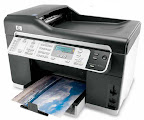
HP OFFICEJET PRO L7590 ALL-IN-ONE PRINTER

Small-Office Champ

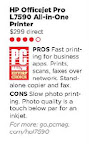
The features that distinguish an office inkjet all-in-one (AIO) from a home model are all represented in the L5790. You get an Ethernet connector; an automatic document feeder (ADF); and the ability to print, scan, and fax over a network, send e-mails with scanned attechments, and make photocopies. But his model's print engine sets it apart as a truly office-centric printer. The L7590 prints text surprisingly well for an inkjet but falls short with photos, The result is an AIO that's truly focused on office use, and squarely targeted at the small and home office.

The L7590 weighs 34.3 pounds, which is on the heavy side of an inkjet but still light enough for one person to move around. A potentially more troublesome issue is the size. At 14 by 20.7 by 18.4 inches (HWD), it's larger than I'd want to have sitting on my desk. More important, it's large enough that you may have trouble finding room for it in a small office where space is tight.

Its bulkiness, however, does not slow it down in text print speed. I timed the L7590 at a total of 9 minutes 14 seconds for our business applications suite, which is significantly faster than some more expensive models and just a touch slower than what has been our Editor's Choice in this category, the HP Officejet Pro L7680 All-in-One. Such speed does not extent to photos, unfortunately. In my test, the L7590 averaged 2:30 for each 4-by-6 and 5:21 for each 8-by-10.

Output quality for the L7590 was impressive for text and graphics. More than half the test fonts were easily readable, and graphics came out better than most inkjets can manage. The photos, however, wre barely true photo quality, with some having colors that were far too punchy and others in which the whole image was darkened. On the plus side, the cost per page for this printer is also an extraordinary low 1.5 cents per black-and-white page, and 6 cents per coor page.


Overall, the L7590 is a close match to the L7690 at a substantially lower price, making it easy pick to replace the L7680 as Editor's Choice for a top-of-the lines small and home office AIO.-M. David Stone

PC Magazine November 2008

www.hp.com

Read More ..

HP PHOTOSMART PRO B8850 PHOTO PRINTER

Pro-Quality Photos on the Cheap

File this HP photo printer under "pleasant surprises." It has several features that make it one of the best sub-$1,000 photo printers available, most notably fully automated self-calibration and a pigment-based ink system. Although it does not include a network connector, it is still an impressive choice.

The B8850's ink system uses eight inks, with a separate cartridge for each color. The pigment-based inks, as opposed to dye based, go hand in hand with better longevity for prints.Finding a spot for the B8850, however, could be a challenge. The printer weighs a hefty 37.7 pounds and measures a relatively large 9.5 by 26.5 b 16.9 inches (HWD). This printer also has a second paper feed slot for printing up to 13 by 19 inches.

In terms of test results, the B8850's total time on the business applications suite was 15 minutes 30 seconds, the same total as that of our previous Editors' Choice, the HP B9180. On our photo suite the B8850 averaged 1:49 for each 4-by-6 and 3:53 for each 8-by-10. For this class of printers, photo quality is a lot more important than speed, so whatever points it loses on speed is more than made up on quality. The results for both color and monochrome prints were as good as those of any printer I've tested, with realistic color,, appropriately subtle shading, and impressively smooth gradients. Graphics and text output on photo paper is similarly high-quality. Because it offers enough extra over its competition at a good price, the B8850 earns our Editor's Choice for low-end prosumer photo printers.-M. David Stone

PC Magazine November 2008

www.hp.com

Read More ..

October 25, 2008

HP Photosmart C4480

A great all-in-one for photos and text
Photobucket

HP'S $99.99 PHOTOSMART C4480 is a fine multifunction inkjet that's easy to use and pumps out great-looking photos and crisp text. It's equally adept at printing, copying, and scanning, making it a well-rounded printer with just a few small flaws.
The C4480 is geared toward local photo printing (networking is not an option), with a multiformat memory-card reader on its faceplate and an optional "photo" tank that improves photos and saves black ink for documents. You don't need a PC to print either-just stick a card in an use the integrated 1.5-inch LCD to print pictures or to start a scan or copy job.
The C4480 is capable of producing high-quality 4,800x1,200 dots per inch (dpi) prints, and we were very impressed by its color accuracy and overal quality. Text reproduction was equally rich.
Scanning at 1,200dpi (either to PC or to a file) is easy; simply press the buttons at the unit's faceplate. It takes about 25 seconds to scan a document, then another 25 seconds to print it.
The printer comes with two stingy introductory tanks, so we recommend HP's high-yield tanks for a wallet-friendly 4 cents per page for black and 6 cents per page for color.
Photobucket
Print speeds are slow, with a 10-page mixed document of text, photos and graphs taking 2 minutes and 49 seconds to print. The upside is that the printer is quiet while printing. We also had problems with the included software, which requires a lot of legwork to print photos.-Josh Norem

Computer Shopper October 2008.
www.hp.com

Read More ..

August 23, 2008

HP COLOR LASERJET CM1312NFI MFP

Little Laser, Big Impact


If you're in the market for a color laser all-in-one printer for your home office or small business, you probably expect to have to compromise on features or performance to keep the cost reasonable. The HP Color LaserJet CM1312nfi MFP has it all, and at a price you can justify spending. It's not perfect, but it's impressive enough to earn our Editor's Choice.
The CM1312nfi offers standalone faxing and color-copying capabilities, and can scan to and fax from a PC over a network. Its 50-page automatic document feeder can handle multipage documents and scan legal-size pages, too. The printer also boasts an extensive set of features, including a network connector and memory card slots.
The CM1312nfi is slow for a laser, at 12 pages per minute for monochrome and 8 ppm for color. It makes up for this with superb output. Text quality is nearly the best available. Graphics and photos are good enough for business use.


The one place where the CM1312nfi skimps is paper handling, with a limited capacity of 150 sheets and no upgrade options. Nevertheless, this color laser delivers fasr more AIO for the price than any of its competitors.
source: PC Magazine August 2008.

www.hp.com

Read More ..

HP TouchSmart IQ506

The touch revolution comes to the living room

TOUCH TECHNOLOGY HAS BEEN AROUND for ages, but only since Apple released the iPhone last year has it been available (or attractive) in any real way. HP's new line of TouchSmart all-in-one PCs, including the $1,499 IQ506, could well further hasten its assimilation into our everyday lives.
The exterior is black, the shiny finish well in keeping with the look of HP's line of regular desktops, and the ultra-glossy 22-inch integrated display screams home theater. But what most defines the new TouchSmart is the eponymous software it uses.
After booting into Windows, press the house-shaped TouchSmart button in the lower-right corner of the display to enter the TouchSmart interface. Tough it's ilttle more than a front end for activating common PC functions like Calendar, Music, Notes, Photo, and Video, the interface is an unusually elaborate one, and one thoughtfully conceived to satisfy its target everyman audience.
Everything works just as you'd expect: Rifle through your photos or your music collection with a flick of your finger, write or record notes in just clicks on digital Post-its, and move icons around by dragging them wherever you want them. We found the touch screen a little finicky, but for the most part, it did just what it needed to do, when we wanted it, and we feel pretty certain that even someone otherwise intimidated by computers would feel right at home around the TouchSmart IQ506.
It's not for power users, though-the hardware (a 2.16GHz Core 2 Duo T7400 mobile processor, 4GB of DDR2 RAM, and nVidia GeFOrce 9300M GS integrated graphics) won't satisfy diehard users or anyone who wants to play intense 3D games. Families, however, are another matter. The TouchSmart was made to put the simplest media-oriented tasks at their fingertips-a TV tuner and roomy 500GB hard drive are also included, though a Blu-ray drive isn't an option on this fixed-configuration system-and at that it succeeds.
Such an achievement is the new TouchSmart line that we wouldn't be surprised if it inspired even the king of this category to make some additions to its upcoming products. The iMac Touch, anyone?

What's the Deal?
One of themost stylistically integrated all-in-ones we've seen, HP's TouchSmart IQ506 brings beautiful design and strongly conceived touch technology to the non-discriminating home computer user.
What it's for: The living room, especially as a TV replacement that offers expanded and easy-to-learn multimedia capabilities.
Who it's for: Someone who doesn't need a ton of power and doesn't want excess aggravation when it comes to learning the myriad and difficult audio, video, and photo apps in Windows.
What's included: Stowed inside the 22-inch wide-screen display you'll find a 2.16GHz Core 2 Duo T7400 processor, 4GB of DDR2 RAM, integrated nVidia GeForce 9300M CS graphics, a 500GB hard drive, a TV tuner, and a DVDRW drive. Also present are a multiformat card reader and light and volume-control buttons for even easier interaction with common adjustments. The TouchSmart software and Windows Vista Home Premium also come preinstalled.

The bottom line: The TouchSmart IQ506 is far from the most powerful PC on the block, but its well-rounded feature set and intuitive sofware will compensate for these deficiencies with users for whom the medium is the message.

source: Computer Shopper September 2008.

www.hp.com

Read More ..

August 01, 2008

Personal Touch


Personal Touch
HP is aiming to revolutionize touch-screen computing once again the the TouchSmart IQ500 series, its expansion of the living-room-friendly TouchSmart line. The eye-catching all-in-one units, which start at $1,299, feature 22-inch high-definition displays operable either by touch (through a special HP software interface), or with the included wireless keyboard and mouse in Windows Vista. Intel processors, 4GB of RAM, 320GB of hard drive space, and integrated Wi-Fi and Bluetooth may give these system legs, but you should really let your fingers do the walking.

source: Computer Shopper August 2008.
www.hp.com

Read More ..

July 10, 2008

HP Voodoo Envy 133


Whoa. We were wondering what would happen when the performance freaks at Voodoo teamed up with HP, and the first notebook to come out of this acquisition is a surprise. No, it’s not a gaming rig. It’s one of the sleekest and most innovative ultraporables we’ve seen. The Envy 133 (starting at $2,099) rocks an instant-on mode that lets you surf the Web and make Skype calls without booting into Windows (called Voodoo IOS) and a slick power brick that doubles as a wireless access point. Intrigued yet?

Voodoo was kind enough to let us steal a pre-production sample for a little hands-on time, and although the Envy 133 was not benchmarkable, we wanted to walk you through everything that makes this dream machine stand out. Stay tuned for a full review.

Design

It all starts with a druable carbon fiber case that weighs 3.4 pounds and measures a mere 0.7 inches thin, complete with retro-chic squared-off edges. This is the kind of minimalist laptop that Christian Bale would carry if they remade American Psycho for the 21st century–in a good way.

Customization options range from your choice of 14 Voodoo Allure paint finishes to a selection of laser engravings. Underneath the lid you’ll find a brilliant 13.3-inch, LED-backlit display whose high-quality fused composite glass runs from edge to edge for a unified aesthetic. Last but not least is a funky backlit keyboard with a space-age font and a multiple-gesture touchpad (for scroll and pinch options) that’s nicely textured.

No Port Envy Here
More important than the Envy 133’s stunning looks are the innovations packed in (and on) this 3.4-pound machine. You can also connect anywhere via optional integrated mobile broadband, a feature the Air lacks. Two USB ports (one of which doubles as an eSATA port for external storage), an HDMI port, and a low-light VGA webcam are just a few more reasons why we would happily tote the Envy 133 anywhere.

The New Instant On

The Envy 133 launches users into an environment where they can surf the Web and make Skype calls within a mere 10 seconds. Called Voodoo IOS, this environment is powered by Splashtop (see our Splashtop FAQ) and gives you the full Internet without having to run Vista in the background. Not only does this feature save time, it should also save battery life. You can also instant message your buddies (via Pidgin) in AOL, Google Talk, MSN, Yahoo, and more, and access photos and music–but not movies on the optical drive.


Juice Meets Connectivity

The 133’s power brick isn’t really a brick at all. It’s more like a flat slab. Voodoo calls it Aura PowerConnect because it allows users to plug in an Ethernet cable for a point-to-point Wi-Fi connection. Essentially , you can create up to a 50-foot wireless network instantly, which is perfect for working in remote offices or hotel rooms with either spotty wireless connections or no Wi-Fi at all.

SSD Optional: The Envy 133 can be ordered with a 4,200-rpm 80GB hard drive or a 64GB solid state drive. Performance hounds will want to opt for the latter, although the instant-on functionality of this notebook makes the boot time advantage of SSD not us compelling.

More Power To You: While the MacBook Air forces you to send in your precious notebook when it’s time to replace the battery, with the Envy 133 you can simply swap and go. The standard battery lasts a respectable (but not great) 3.45 hours between charges.

Matching External Optical Drive Included: Although Apple charges $99 bucks for an external optical drive on the MacBook Air, Voodoo bundles every Envy 133 with an ID-coordinated DVD burner (sorry, no Blu-ray yet).

Outlook: Although the Voodoo Envy 133 is considerably more expensive than the MacBook Air’s starting price of $1,799, and it’s not quite as thin or light, you do get a lot for your money, including more ports, the best instant-on mode yet, and a replaceable battery. The fact that you can customize the Envy 133 to your heart’s content is icing on the cake.

Full Specs for Voodoo Envy 133


CPU: 1.6-GHz Intel Core 2 Duo SP7500 or 1.8-Ghz SP7700

Operating System: Windows Vista

RAM/Expandable To: 2GB/2GB

Hard Drive Size/Speed: 64GB SSD (optional 80GB/4,200 rpm)

Optical Drive: external 8X or 6X dvd+/-RW

Display/Resolution: 13.3 inches/1280 x 800

Graphics/Video Memory: intel GMA X3100/384MB

Wireless Networking: 802.11g/n, Bluetooth 2.0

Ports: One usb, esata/usb, hdmi, headphone/mic • Card Slots: expresscard/34

Size: 12.7 x 9.0 x 0.7 inches

Weight: 3.4 pounds

www.hp.com

Read More ..